
Download nutrIA – calorie tracker, meal logging, nutrition app, healthy eating, food diary, weight management, dietary tracking, calorie intake, food photography, meal analysis
Overview
nutrIA is a mobile application designed to simplify daily caloric intake tracking for individuals focused on health and fitness. Built with a photo-based approach, the app enables users to log meals by simply taking a picture of their food, eliminating the need for manual input. This feature is particularly useful for those seeking a seamless way to monitor dietary habits without the friction of typing or searching through food databases. The application falls under the health and fitness category, targeting users aiming to manage weight, improve eating habits, or maintain nutritional awareness.
Real-world usage scenarios include tracking meals during busy workdays, monitoring portion sizes for weight management, or gaining insight into nutrient distribution across daily meals. The app’s intuitive interface supports users of all experience levels, from beginners to those already engaged in structured diet planning. While the developer is identified as the NutrIA Team, no further details about the organization’s background were provided. The app is available for free on the Android platform, making it accessible to a broad audience interested in promoting healthier lifestyles through digital tools.
Key Features & Capabilities
- Photo-Based Meal Logging – Users can capture images of their meals to automatically detect and log food items, reducing the time and effort required for manual entry.
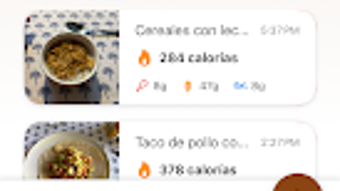
- Instant Calorie and Nutrient Breakdown – The app analyzes food images to provide immediate insights into caloric content and essential nutrients such as protein, carbohydrates, and fats.
- Food Diary Integration – All logged meals are stored in a personal food diary, allowing users to review past intake and identify eating patterns over time.
- Visual Nutrition Tracking – Users can view graphical representations of daily nutrient consumption, helping to visualize dietary balance and make informed adjustments.
- Weight Management Support – By tracking calorie intake and offering nutritional feedback, the app supports users in achieving personal health goals such as weight loss or maintenance.
These features are especially beneficial for individuals managing busy schedules who need a fast and accurate way to stay on top of their diet. For example, someone on a fitness journey can use the photo feature to log lunch at work without interrupting their workflow. Similarly, users aiming to reduce sugar intake can monitor daily consumption through visual reports. The integration of image recognition technology enables efficient, real-time analysis, positioning nutrIA as a practical tool for modern dietary tracking.
User Interface, Workflow & Performance
The user interface of nutrIA is designed with simplicity and accessibility in mind, featuring a clean layout that prioritizes core functions. Navigation is streamlined, allowing users to access meal logging, the food diary, and nutritional summaries with minimal taps. The main screen typically displays a camera icon for quick meal capture, followed by a dashboard that shows daily progress toward caloric goals.
Workflow efficiency is enhanced by the photo-based system, which reduces the number of steps required to log a meal. Once a photo is taken, the app processes it and presents a summary of detected food items and their nutritional values. While specific performance metrics such as CPU or RAM usage were not disclosed, the app’s lightweight size of 45 MB suggests optimized resource management. The developer did not provide additional system requirements, so performance may vary depending on device capabilities. General software behavior patterns suggest stable operation under normal usage conditions, though real-world performance may depend on camera quality and processing speed of the host device.
Compatibility & System Requirements
nutrIA is designed for the Android operating system, ensuring compatibility with a wide range of mobile devices running the platform. The current version is 1.2.3, released on March 15, 2024. The application has a download size of 45 MB, which is considered compact for a feature-rich health app. This makes it suitable for devices with limited storage space.
Platform compatibility information is limited to Android. The developer did not specify minimum hardware requirements, such as RAM or processor type. Exact system requirements were not listed, so users should ensure their device meets general Android standards for running modern applications. Compatibility with older Android versions was not confirmed. Installation and operation are expected to function on standard Android smartphones and tablets, though individual results may vary based on device specifications.
Pros and Cons
Pros
- Photo-based meal logging reduces manual input and improves user convenience.
- Instant nutrient analysis helps users make informed dietary decisions in real time.
- Free to download and use, enhancing accessibility for health-conscious individuals.
- Intuitive interface suitable for users of all technical skill levels.
- Compact file size (45 MB) ensures quick installation and minimal storage impact.
Cons
- Availability limited to Android; no support for iOS or other platforms.
- Accuracy of food detection may vary depending on image quality and lighting conditions.
- No offline functionality was mentioned, requiring internet access for full feature use.
- Advanced analytics or integration with wearable devices were not specified.
- Limited system requirements information may affect user confidence in compatibility.
FAQ Section
Is nutrIA available for iOS devices?
As of the current release, nutrIA is only available for Android. There is no official information about future support for iOS or other platforms.
Is the app secure and private?
While the developer did not provide detailed privacy policies, the app is designed to handle personal dietary data. Users are advised to review the app’s permissions and privacy settings before use.
Does nutrIA require an internet connection?
Based on the photo-based tracking feature, an internet connection is likely required for image analysis and nutrient data retrieval. Offline usage capabilities were not specified.
How often are updates released?
The app was last updated on March 15, 2024. The developer has not disclosed a regular update schedule, but future updates may include feature improvements or bug fixes.
Can I use nutrIA without a subscription?
Yes, nutrIA is currently free to download and use. No subscription model or in-app purchases were mentioned in the provided details.
Final Thoughts + CTA
nutrIA stands out as a practical and accessible tool for individuals committed to tracking their daily caloric intake with minimal effort. Its photo-based meal logging system offers a modern, user-friendly alternative to traditional food diaries, making it ideal for busy professionals, fitness enthusiasts, and anyone seeking to adopt healthier eating habits. While platform availability is currently restricted to Android and some advanced features remain unspecified, the app delivers on its core promise: fast, accurate, and intuitive dietary tracking.
For users looking to simplify their nutrition journey without investing in premium tools, nutrIA provides a compelling free solution. Its lightweight design, clear interface, and real-time feedback make it a strong contender in the health and fitness app space. The lack of a subscription model further enhances its value proposition.
Download nutrIA now to take control of your diet with ease and precision.







